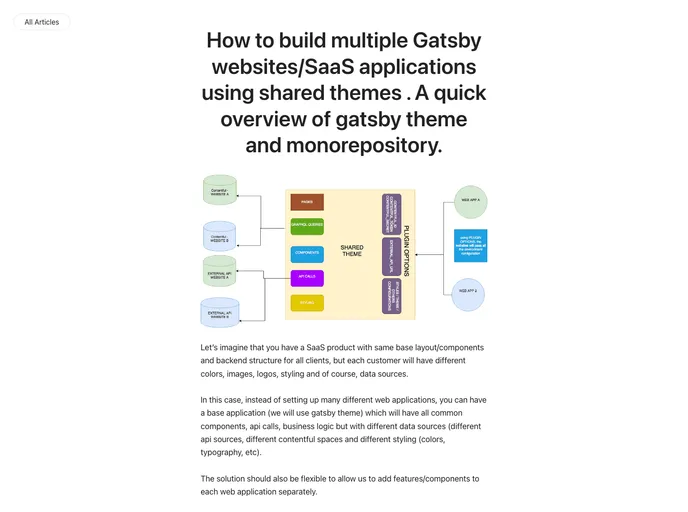
How to build multiple web apps using the same layout, pages, components, services, graphql but changing specific things such as colors, images, styles, images, data, etc. This is possible and easy to achieve, thanks to gatsby-theme
The gatsby-monorepository-shared-theme is a project under development that demonstrates how to set up multiple websites using the same “layout” theme while allowing for customizations such as colors and images. This approach makes it possible to build a SaaS application for multiple customers using a shared code base. The project utilizes Gatsby Theme, which simplifies the sharing of components, services, GraphQL queries, and pages. It offers easy maintenance and deployment, making it a valuable tool for creating independent web applications that share logic but differ in specific aspects.
npm install -g gatsby-cli
npm install -g yarn
git clone [repository-url]
cd [project-directory]
yarn install
# Example of changing colors
const primaryColor = 'red';

# Example of changing images
const logoImage = require('path/to/logo.jpg');

# Example of changing data structure
const data = [
  {
    title: 'Blog Post 1',
    content: 'Lorem ipsum dolor sit amet.',
  },
  {
    title: 'Blog Post 2',
    content: 'Lorem ipsum dolor sit amet.',
  },
];
gatsby build
# Deploy command for Netlify or other hosting service
The gatsby-monorepository-shared-theme project showcases how multiple websites can be built using the same “layout” theme while allowing for customization. It utilizes Gatsby Theme, which facilitates the sharing of components, services, GraphQL queries, and pages, making it easy to maintain and deploy the websites. The shared theme offers benefits such as improved maintenability, DRY code, and accelerated development speed. However, it should be used with caution as excessive abstractions can make the code complex and inflexible. Overall, the project showcases the power and utility of monorepositories and the potential for creating SaaS applications for multiple customers using shared code bases.

